
ATLAS Explain in your AI assistant
Add ATLAS Explain as a connector, and Claude, ChatGPT, Cursor or VS Code can explain market terms, look up official figures and draw crypto price charts while you chat. Every answer names its source. Free, read-only, no account.
https://atlas-explain-mcp.atlas-explain.workers.dev/mcpWhat your assistant can do with it
Explain and learn
Plain-language meanings for market terms, and the learning path topic by topic, from a curated glossary.
Look up an asset
What it is, where and when it trades, and its latest official figure or price, or why no price is shown.
Official figures
US Treasury yields, ECB and Bank of Canada rates, EIA energy prices, and SEC-filed figures for large US companies, each with its source and date.
Crypto prices and charts
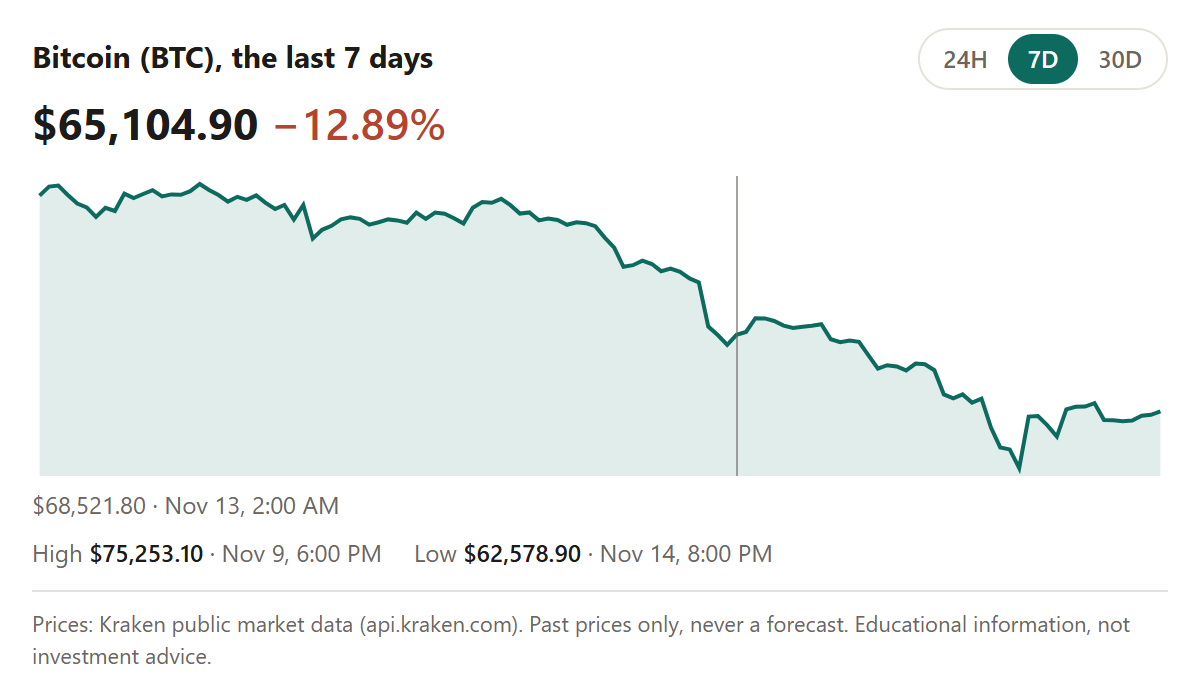
Prices for ten major coins, refreshed hourly, and how a coin moved over 24 hours, 7 days or 30 days, drawn as an interactive chart in Claude and ChatGPT. Every answer says when the prices were collected.
Set it up
Claude (web and desktop)
- Open Settings, then Connectors, then Add custom connector.
- Name it ATLAS Explain and paste the connector address. Leave the OAuth fields empty; no sign-in is needed.
- In a chat, turn the connector on and ask, for example: "Using ATLAS Explain, what is a stop-limit order?"
Claude Code
Run this once in a terminal:
claude mcp add --transport http atlas-explain https://atlas-explain-mcp.atlas-explain.workers.dev/mcpChatGPT
- Turn on developer mode in Settings, under Apps and connectors (available on some plans).
- Create a connector, name it ATLAS Explain, paste the connector address, and choose no authentication.
Cursor
Add this to ~/.cursor/mcp.json (or the project's .cursor/mcp.json):
{
  "mcpServers": {
    "atlas-explain": { "url": "https://atlas-explain-mcp.atlas-explain.workers.dev/mcp" }
  }
}
VS Code
Add this to .vscode/mcp.json, or run "MCP: Add Server", choose HTTP and paste the address:
{
  "servers": {
    "atlas-explain": { "type": "http", "url": "https://atlas-explain-mcp.atlas-explain.workers.dev/mcp" }
  }
}
Any other MCP client
Use the connector address with the Streamable HTTP transport and no authentication.
Things to ask
- "What is a bid-ask spread? Explain it with ATLAS Explain."
- "Show me Bitcoin's price over the last 7 days."
- "Using ATLAS Explain, what is the US 10-year Treasury yield, and what are Apple's latest SEC-filed figures?"
- Or pick a ready-made prompt from the connector: Today's market brief, Explain an asset or Learn the next topic.
What it never does
- No trade advice. It explains and shows sources. It never recommends a trade or forecasts a price.
- Nothing made up. When data is missing it says so and why, instead of filling the gap.
- Read-only, no account. It changes nothing, needs no sign-in, and stores none of the requests it answers. See how the connector handles data.
Prefer not to use an assistant? The same Explain, Learn and Assets are in the web app.